The Future of Customer Experience: Predictive, Personalized, and AI-Driven

The future of customer experience is predictive, personalized, and AI-driven. Brands are shifting from reacting to problems toward preventing them, from generic messaging toward tailored journeys, and from manual analysis toward AI that reads every customer signal. This post breaks down the three shifts, the data behind them, and how to prepare without losing the human touch.


The future of customer experience belongs to brands that stop reacting and start anticipating. The experimentation phase with AI is over. McKinsey’s global AI survey found 88% of organizations now use AI in at least one business function, up from 78% the year before. In customer-facing work, that shift is already changing what people expect from every interaction.

Customers now expect brands to know them, help before they ask, and respond in seconds. Meeting that bar by hand is no longer possible. Three forces are reshaping the field: prediction, personalization, and AI. Each is useful alone. Together, they redraw the map. Let’s look at what that future means, and how to prepare.

What Does the Future of Customer Experience Look Like?

The future of customer experience is proactive, individual, and machine-assisted. Brands will predict needs before customers voice them, tailor each journey to the person, and use AI to read feedback at a scale humans cannot match. The reactive, one-size-fits-all model is ending.
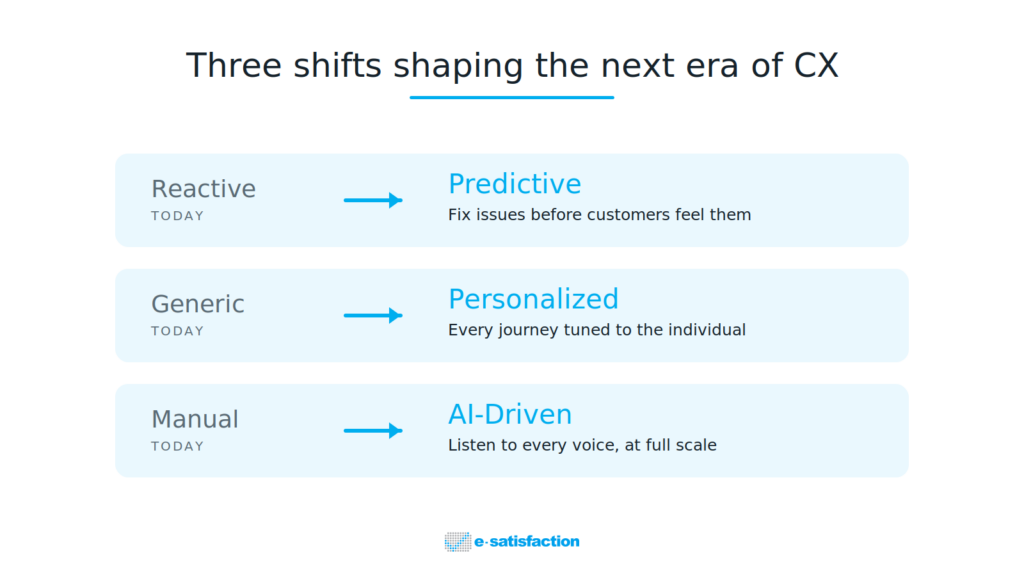
That plays out as three shifts. For years, most CX teams worked backward. They waited for a survey score to drop, a complaint to land, or churn to show up in a report. By then the customer had already decided. The next era flips that order. The smartest teams are building the data and AI in customer experience capabilities to move from scorekeeping to problem-solving.

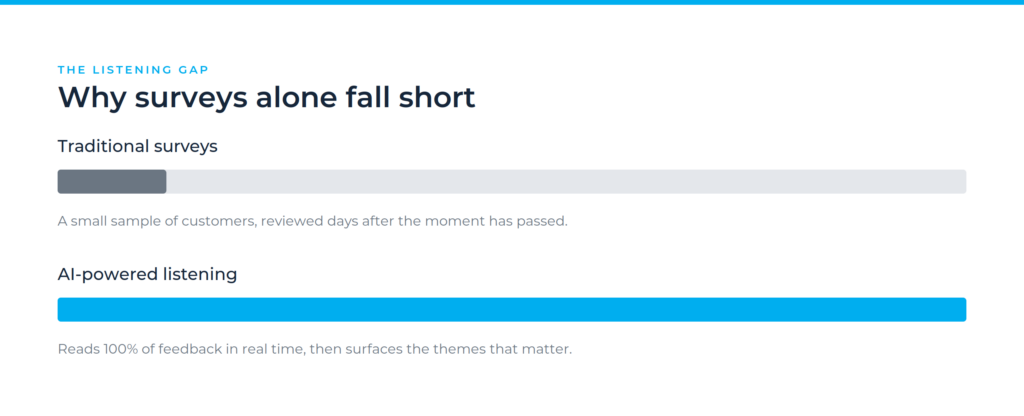
This is also why old feedback habits are breaking down. Many programs still lean on slow, sampled surveys that miss most of what customers feel. We covered this in detail in why traditional customer feedback programs fail without AI.

From Reactive to Predictive: Service That Fixes Problems First

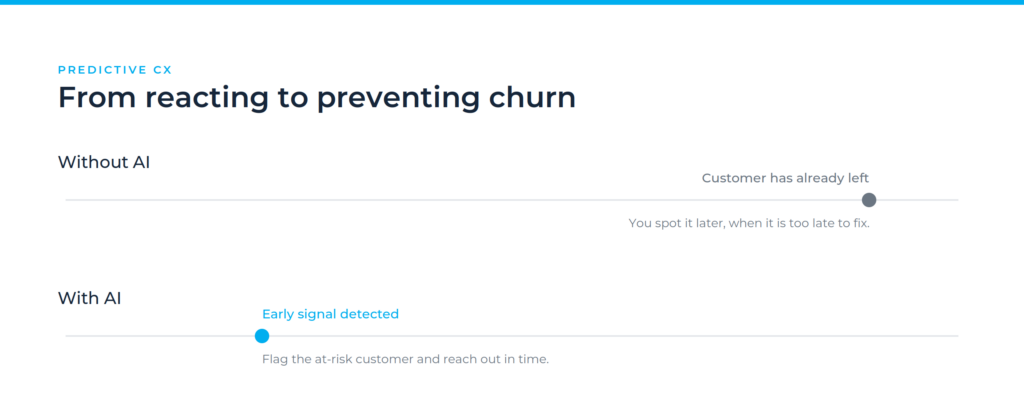
Predictive CX uses data and AI to spot issues before customers report them. Instead of waiting for a complaint, brands flag a stalled order, a confused checkout, or a frustrated tone in real time. The goal is simple: solve the problem before it becomes a reason to leave.

This shift is already named by analysts. Gartner identifies proactive issue prevention as a defining trend reshaping customer service through 2028, with AI predicting service issues before they occur. The focus moves from managing demand to creating value.

Prediction depends on listening to weak signals. A drop in tone, a repeated question, a hesitation at payment: each is a clue. AI reads these patterns across thousands of interactions at once. We broke down exactly how this works in how AI detects customer frustration before it escalates, where AI sentiment analysis turns raw emotion into an early warning.

Why Does Personalization Matter More Than Ever?

Personalization means shaping each experience around the individual: their history, their context, their intent. It is no longer a nice extra. It is the baseline customers expect, and the gap between brands that do it well and those that fake it is widening fast.

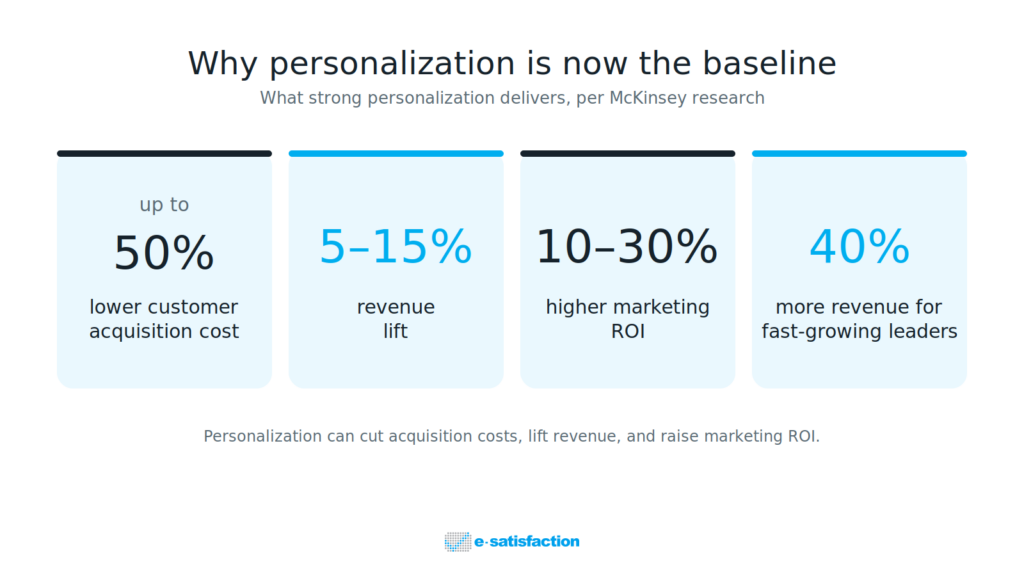
The business case is strong. McKinsey reports that personalization can cut customer acquisition costs by up to 50%, lift revenues by 5 to 15%, and raise marketing ROI by 10 to 30%. Faster-growing companies pull 40% more of their revenue from personalization than slower peers.
Yet most brands overrate themselves. Research shows 85% of companies believe they personalize well, but only 60% of customers agree, and 76% feel frustrated when personalization is missing. Closing that gap starts with real data, not guesses. Strong customer feedback analytics tells you what each segment actually wants, so tailoring is grounded in evidence.

Personalization at this level is hard to run on instinct. If your team is still stitching insights together by hand, see how purpose-built AI customer experience solutions turn scattered signals into tailored action.

How Is AI Changing the Way Brands Listen to Customers?

AI lets brands hear every customer, not just the few who answer a survey. It reads chats, calls, reviews, and open comments in their own words, then surfaces themes, sentiment, and intent. Listening shifts from a sample to the whole conversation.

This is the engine behind both prediction and personalization. Without it, the other two shifts stall. Modern AI Voice of Customer tools turn unstructured feedback into structured, ranked insight in near real time. That is the difference between knowing a score and knowing why it moved.

Free-text feedback used to sit unread because no team could process it at scale. Now conversational analytics reads it automatically. We traced this shift in from surveys to conversations: the evolution of customer feedback analytics, which shows why always-on listening is replacing the annual survey.

The Rise of Agentic AI in Customer Experience

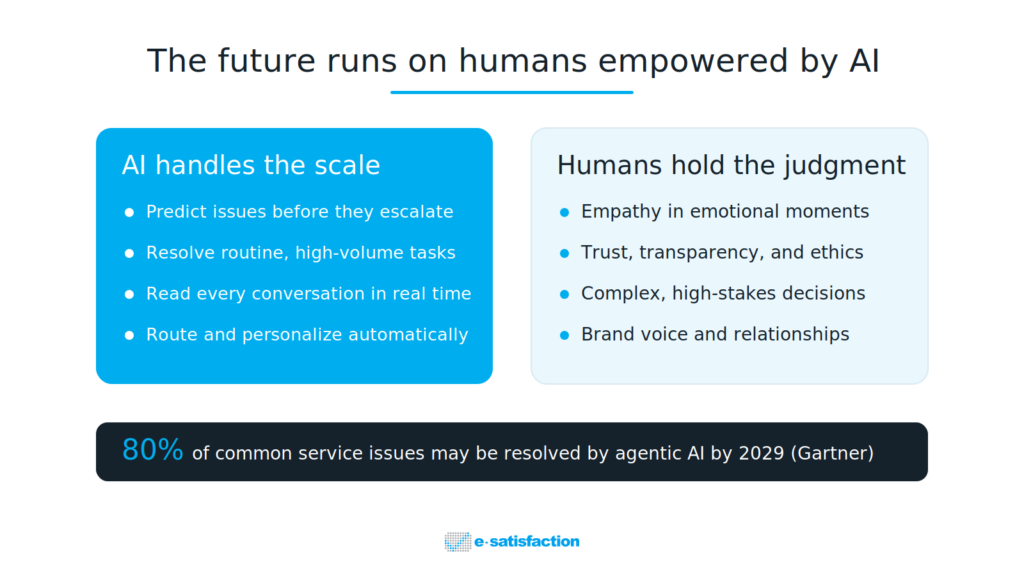
The next wave is agentic AI: systems that do not just answer but act. Gartner predicts agentic AI will autonomously resolve 80% of common customer service issues by 2029. These agents can navigate a process, update a record, or resolve a request end to end.
Adoption is real but still early, which favors movers who prepare now. The pressure is clear: a Gartner survey found 91% of customer service leaders are under pressure to implement AI. The winners will pair automation for speed with human judgment for everything that needs care.

Will AI Replace the Human Touch in CX?

No. The future of customer experience is humans empowered by AI, not humans removed from it. AI handles scale, speed, and pattern-spotting. People handle empathy, trust, and the hard calls. Hand emotional moments to a bot and satisfaction drops fast.

The risk is moving too quickly. Forrester warns that over-automating complex, emotional inquiries will frustrate customers and erode satisfaction, even as simple self-service improves. Trust is now measurable, and poorly built AI can spend it quickly.

That is why the strongest 2026 strategies treat AI as an amplifier of human judgment. Forrester’s CX predictions urge teams to shift from measurement without meaning toward advanced analytics and real problem-solving. The technology earns its place only when it makes the human experience better.

The Takeaway

Three points are worth keeping.

The future of customer experience is built on prediction, personalization, and AI working together. Each shift reinforces the others, and the brands that combine all three will pull ahead. It is also a data problem before a technology one, since you cannot predict or personalize what you cannot hear.

The brands that win will not be the ones with the most customer data. They will be the ones that act on it the fastest, with people and AI playing to their strengths. Ready to see your own feedback turned into predictive, personalized action? Book a demo and explore what AI in customer experience can do for your team.


Frequently Asked Questions

What is the future of customer experience?

The future of customer experience is predictive, personalized, and AI-driven. Brands move from reacting to problems toward preventing them, from generic outreach toward individual journeys, and from manual analysis toward AI that reads every signal. Human judgment stays central for empathy and complex decisions.

What is predictive customer experience?

Predictive customer experience uses data and AI to anticipate a customer’s needs or problems before they are voiced. It spots early signals, like a stalled checkout or a frustrated tone, and lets teams act in real time. The aim is to resolve issues before they cause churn.

How does AI improve personalization in CX?

AI analyzes each customer’s history, behavior, and feedback to tailor content, offers, and support in real time. Done well, this can lower acquisition costs, lift revenue, and raise marketing ROI. The key is grounding it in real feedback data rather than broad assumptions.

Will AI replace human customer service agents?

No. AI will handle routine, high-volume tasks and surface insight, while people focus on empathy, trust, and complex cases. Analysts caution that over-automating emotional interactions frustrates customers, so the strongest model is humans empowered by AI, not replaced by it.

How should brands prepare for an AI-driven CX future?

Start with listening. Build the ability to capture and analyze all customer feedback, not just survey samples, then layer prediction and personalization on top. Pair automation with clear human oversight, and treat trust and transparency as core parts of the design.
Why AI in Customer Experience Is No Longer Optional

AI in customer experience has shifted from a nice-to-have to a baseline expectation. Customers now demand fast, personal, consistent service across every channel. AI helps brands listen at scale, predict churn, and act on feedback in real time. The brands that wait risk losing customers who quietly leave for someone faster.


Customer expectations have outgrown what manual teams can deliver. People want answers in seconds, service that remembers them, and offers that fit their needs. AI in customer experience is how modern brands meet that bar without burning out their teams. It is no longer a futuristic add-on. It is becoming the engine behind everyday CX.

The pressure is real.McKinsey research found 71% of consumers expect personalized interactions, and 76% get frustrated when they don’t get them. Surveys alone can’t keep up with that demand. They reach a fraction of customers and arrive too late to fix anything. This is the gap AI fills. Below, we break down what AI in CX really means, why expectations are forcing the change, and where it pays off.

What Does AI in Customer Experience Actually Mean?

AI in customer experience means using machine learning to listen, understand, predict, and respond to customers at scale. It reads every piece of feedback, spots patterns humans miss, flags at-risk customers, and powers personal interactions across channels. It works alongside teams, not instead of them.

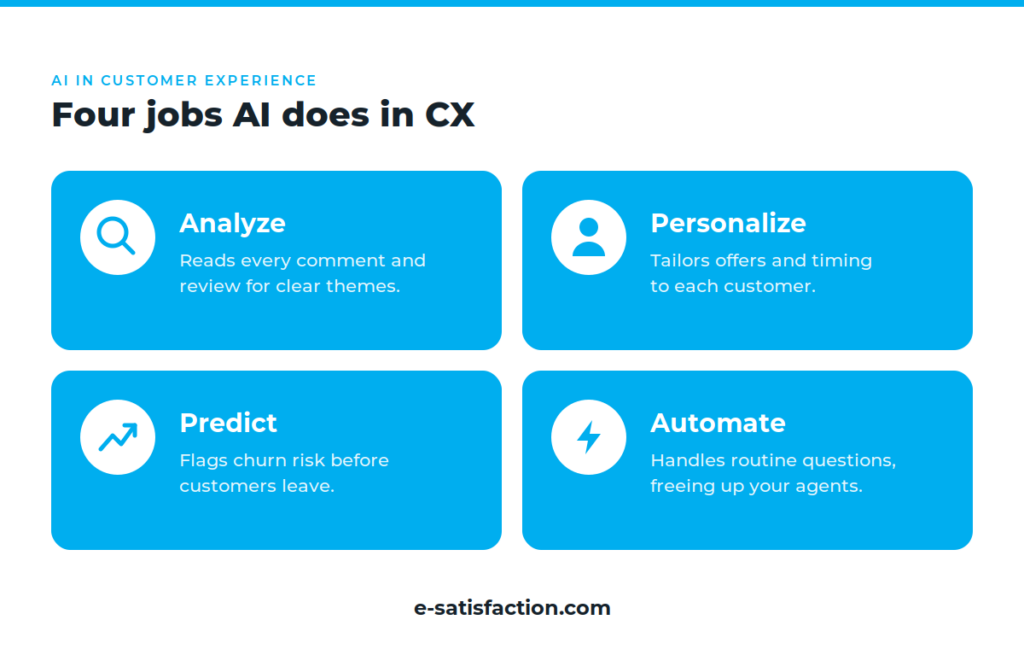
In practice, AI in CX shows up in four ways. It analyzes feedback and reviews to find themes. It personalizes recommendations and messages. It predicts behavior like churn or repeat purchase. And it automates routine support so people can focus on harder problems. Most brands start with one and expand. A solid Voice of Customer framework ties these pieces together so insights flow into action instead of sitting in a dashboard.

Why Are Customer Expectations Forcing the Shift?

Customers now compare every brand to the best digital experience they’ve ever had. They expect speed, memory, and relevance by default. When a brand can’t deliver, they leave quietly and rarely explain why. AI helps brands meet that standard at a scale humans cannot match alone.

The data backs this up. Personalization is no longer a perk. McKinsey found that strong personalization can lift revenue by 5% to 15% and cut acquisition costs by as much as 50%. Doing that across thousands of customers by hand is impossible. AI makes it routine. It tailors content, timing, and offers based on real behavior, then learns and improves with each interaction.

How Does AI Turn Customer Feedback Into Action?

AI turns feedback into action by reading 100% of comments, reviews, and survey responses, then grouping them into clear themes with a sentiment score. Instead of skimming a sample, teams see the full picture in minutes and know exactly which issues hurt loyalty most.

This is the biggest leap over old methods. Traditional surveys capture a small slice of customers and miss the “why” behind the score. AI reads open-text feedback, detects emotion, and surfaces the root cause. A negative trend in checkout, a recurring delivery complaint, a product flaw: all of it becomes visible fast. The point is not the analysis itself but what follows. The strongest programs turn feedback into action by routing each insight to the team that can fix it and closing the loop with the customer.

If this sounds familiar, you don’t have to start from scratch. See how brands have already done this by turning unhappy customers into a clear action plan.

Can AI Predict Churn Before Customers Leave?

Yes. AI predicts churn by spotting early warning signals in behavior and feedback, such as falling engagement, rising complaints, or souring sentiment. It flags at-risk customers while there is still time to act, so teams can intervene before the customer is gone.

Most churn happens silently. Unhappy customers rarely complain; they just stop coming back. AI changes the timeline by watching the signals that come before a customer leaves. When the model flags risk, the right team can reach out with a fix or an offer. This is the shift from reacting to problems to preventing them. Pairing predictive models with how real-time feedback works lets brands catch issues at the exact moment they form.

The Personalization and Automation Payoff

The return on AI in CX is both financial and operational. On the customer side, faster answers and relevant offers raise satisfaction and loyalty. On the team side, automation handles routine questions so agents can spend time where empathy and judgment matter.

The market is moving fast. A 2026 industry report found that 78% of organizations expect AI agents to handle at least half of customer support interactions within 18 months, and most report measurable gains in retention. Analysts also see AI moving from automation toward anticipation, where systems act before a customer even asks. The goal is not to remove people. It is to free them for the moments that build real relationships. A connected customer experience platform keeps the human and the automated working from the same data.

Where AI in CX Goes Wrong

AI is not a magic fix. It fails when data sits in silos, when automation replaces human care in sensitive moments, or when personalization crosses into feeling intrusive. The brands that win treat AI as a tool for better human decisions, not a way to remove humans.

Trust is the line to watch. Research shows customers are comfortable with AI for routine tasks but far more cautious with sensitive or high-stakes decisions. Push too far and you erode the loyalty you were trying to build. Clean, unified data and clear handoffs to people keep AI helpful instead of harmful. The strategy matters more than the algorithm.

The Bottom Line

AI in customer experience has crossed from optional to essential. Three things are clear. Customers expect personal, fast, consistent service, and they leave quietly when they don’t get it. AI lets brands listen to everyone, predict problems, and act in real time. And the technology only works when it supports human judgment, not replaces it.

The brands pulling ahead are not waiting for AI to be perfect. They are using it now to understand customers better and fix issues faster. The cost of standing still is customers you never hear from again.

Ready to stop guessing and start acting on real customer feedback? Request a demo and see how it works for your brand.

Frequently Asked Questions

What is AI in customer experience?

AI in customer experience is the use of machine learning to listen to, understand, predict, and respond to customers at scale. It analyzes feedback, personalizes interactions, predicts behavior like churn, and automates routine support so teams can focus on complex needs.

Why is AI becoming essential for CX?

Customer expectations now outpace what manual teams can deliver. People want fast, personal, consistent service across every channel. McKinsey found 71% of consumers expect personalized interactions and 76% get frustrated without them. AI is the only practical way to meet that demand at scale.

Can AI really reduce customer churn?

Yes. AI detects early signals of churn, such as falling engagement or negative sentiment, often before a customer complains or leaves. This lets teams step in with a fix or offer while there is still time, shifting the focus from reacting to preventing.

Does AI replace human customer service teams?

No. AI handles routine, repetitive tasks and surfaces insights, but human judgment and empathy still matter most in sensitive moments. The strongest CX programs use AI to support people, not to replace them.

What is the risk of using AI in customer experience?

The main risks are siloed data, over-automation in sensitive situations, and personalization that feels intrusive. Customers trust AI for routine tasks but stay cautious with high-stakes decisions. Unified data and clear handoffs to humans keep AI helpful.

AI-powered Topic Detection built for CX Operations

Customer comments are gold. But as anyone managing CX today knows, that gold is buried under mountains of text — open-ended feedback from surveys, public reviews, social media, even support interactions like call transcripts. Teams try to tag and bucket insights manually, but it’s slow, inconsistent, and almost impossible to scale.

That’s where e-satisfaction’s ATD capability comes in, a technology we’ve build and have been developing over 2years and now are infusing in our platform

✨ What Is ATD?

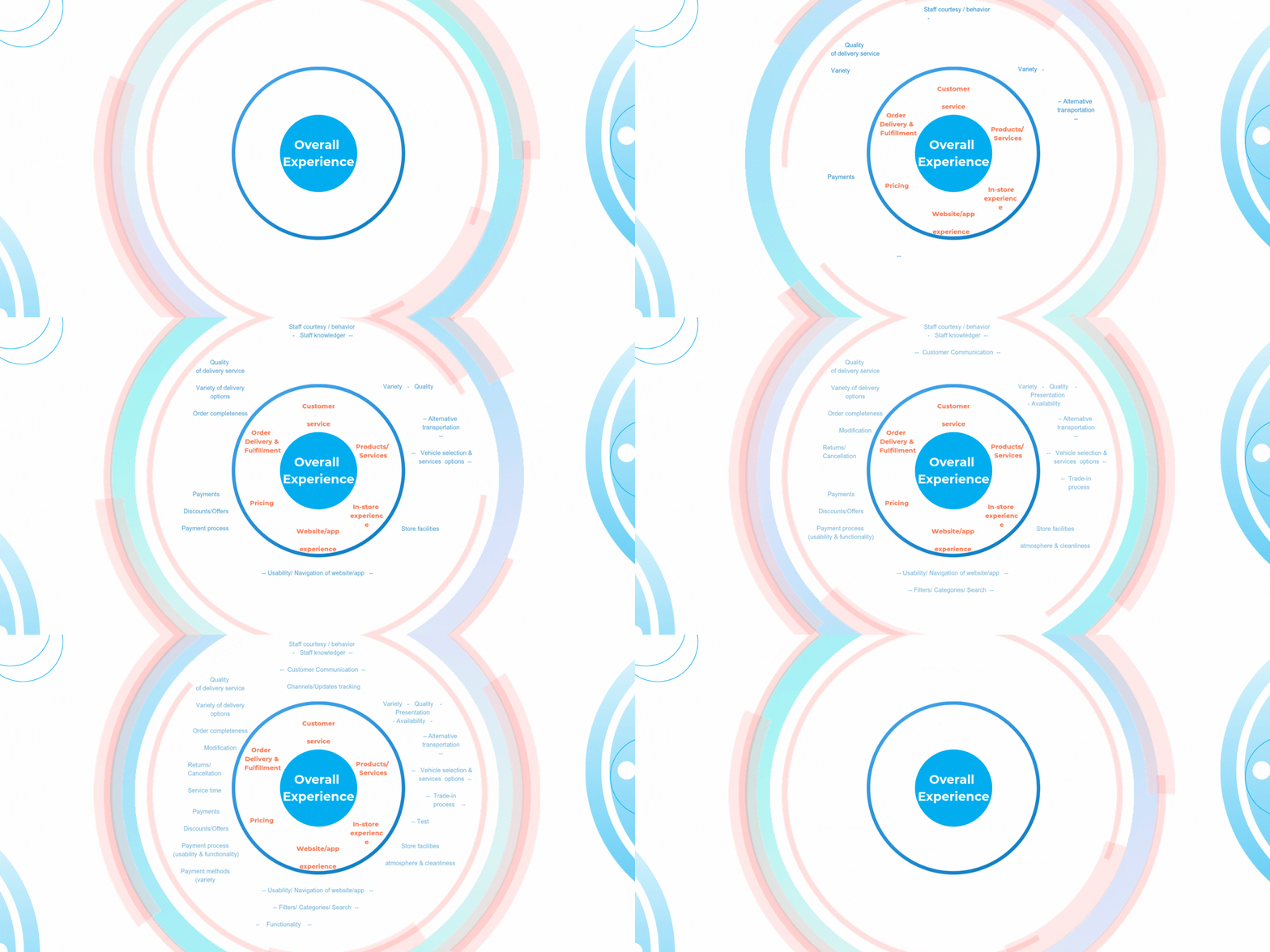
Automatic Topic Detection (ATD) is our AI-powered topic detection engine that reads open-ended customer feedback and automatically classifies each comment into business-relevant topics, organized in a clear 3-level hierarchy:

  • Experience Domains is the 1st level representing high-level areas of the customer journey or experience focus. E.g. – 
  • Focus Areas & sub-domains is the 2nd level representing the Specific dimensions or sub-domains within each experience category. E.g Delivery Service, Staff Behavior, Staff Quality, Product Availability, Delivery service & options.
  • Finally, Operational Customer Signals is the 3rd and most granular level representing the detailed, operational-level topics that represent the actual voice of the customer. e.g., Payment Methods, Refund Delays, Staff knowledge, Stock Issues, Quality of delivery service.

Each piece of feedback can be assigned to one or more topics based on content — whether it’s collected via a survey, imported from review, or pulled from historical data. The result? Structured, ready-to-use insights that reflect your business operations.

While the ATD model is technically built on a 3-level topic hierarchy, our product will offer it in 2 tiers:

  • Tier 1 (Experience Domain Topics): Strategic domain-level tagging (equivalent to Level 1) — included in all plans.
  • Tier 2 (Advanced Operational Topics) offering the tags in Focus Areas and Operational signals (Levels 2 & 3) — available as an add-on or in premium plans.

🤖 Why It Matters Now

The volume of unstructured feedback is exploding. Yet most CX and operations teams don’t have the time or tools to process it at scale — let alone connect it to KPIs like NPS, CSAT, or cost-to-serve. With e-satisfaction’s ATD capability:

  • Your team eliminates manual tagging and gains back hours every week
  • You gain instant view into aggregated topics that customers are talking about the most
  • Your reports transform from simple data charts to insights that guide/ prioritize actions based on real, recurring issues — not hunches

How It Works

ATD turns your scattered feedback into structured CX insights — in four clear steps:

1. Connect Your Feedback Sources

Start by gathering and syncing all qualitative feedback into the e-satisfaction platform.This includes: Survey responses (from e-satisfaction or other tools), Google and public reviews, Social channel comments, even support interactions or call transcripts.

2. AI Engine Analyzes Every Comment

Once your data is in, e-satisfaction’s AI engine goes to work. It reads and parses each comment using appropropriate industry-tuned models powered by a business-aligned taxonomy

3. Each Comment Is Tagged with Structured Topics

Based on its analysis, the AI assigns every relevant topic tags (not just one) to each comment — instantly, ensuring assignment across tier. This gives every piece of feedback consistent, scalable structure.

4. Insight Flows into Prebuilt CX Reports

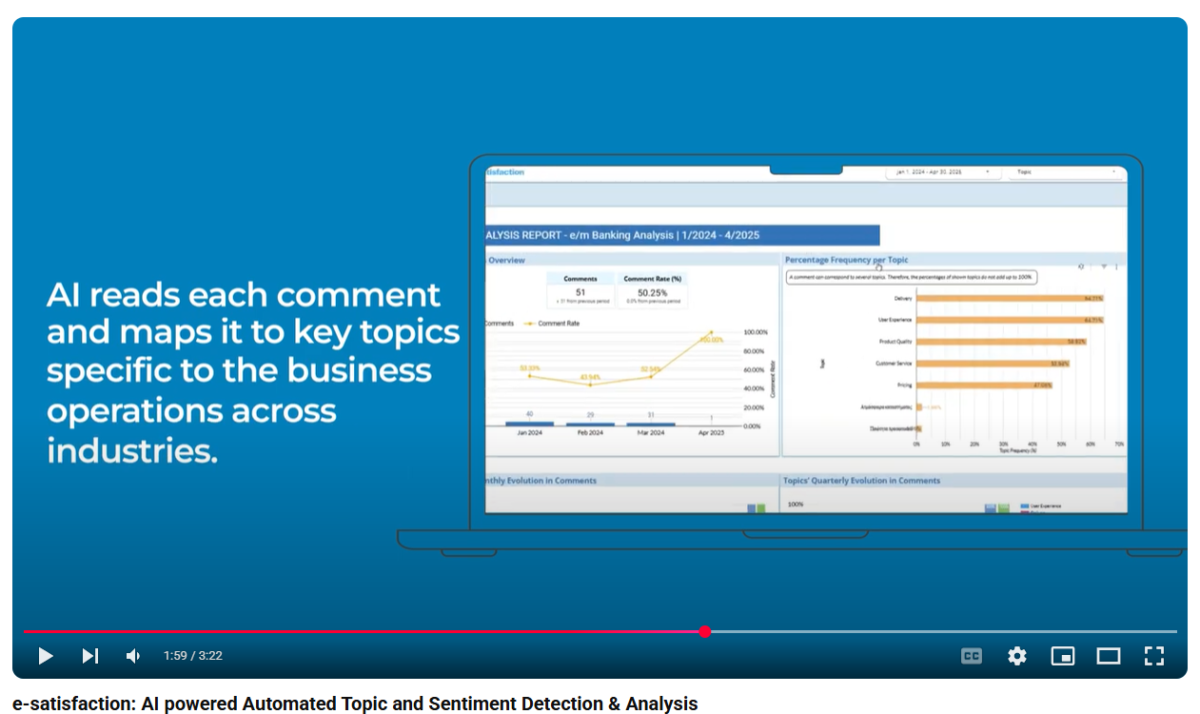
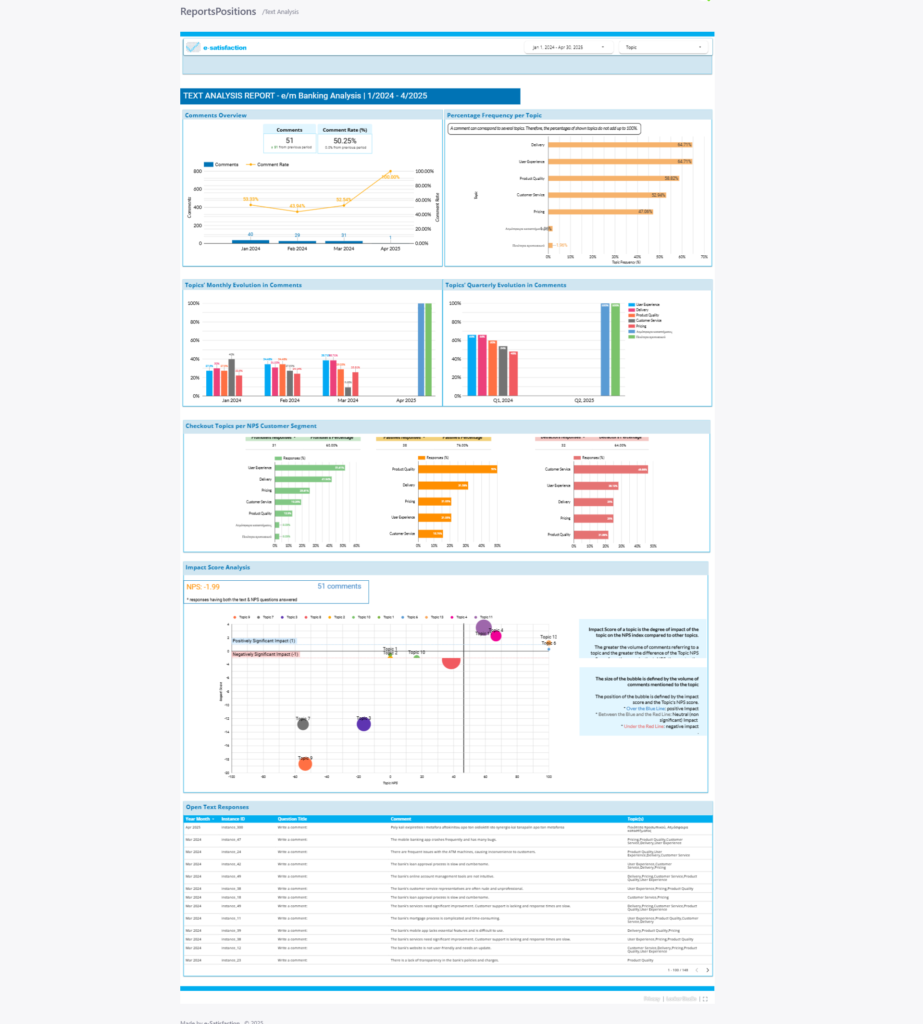
The AI-generated tags automatically populate in e-satisfaction’s CX Insights Portal for all relevant Text Analytics reports. This way customers can see the raw table showing which topic tags have been assigned to each comment, explore charts featuring most frequent topics, topic breakdowns by NPS score, as well sa dive deeper using Impact Score Analysis highlighting which topics affect metrics like NPS.

🎯 What Makes It Different?

Most topic models are vague. They produce tags that lack structured naming, structure/ taxonomy and can be inconsistent in how they treat similar comments. Worse, producing labels that are too broad to act on.

e-satisfaction’s ATD is different. It’s built for clarity, consistency, and operational value – action!

  • Purpose-built taxonomy
    Instead of relying on machine-learned guesses,  e-satisfaction models apply a curated set of topics based on over 4 years of real feedback analysis — including hundreds of thousands of omnichannel survey responses across industries.
    This means each out-of-the-box (OOTB) topic has been hand-picked to be business-aligned and grounded in reality — from strategic areas of experience domains to the operational signals

  • Industry-tuned models
    Whether you’re in retail, banking, automotive, or service, e-satisfaction AI engine uses models adapted to the verticals / domains organizations operate in— ensuring the topics it identifies actually make sense for how your business runs. For example, ‘Service’ means something different in retail vs. automotive— and our AI understands that.

  • Multi-level structure
    Comments aren’t labeled with just one broad tag. Instead, each piece of feedback can be mapped across two tiers, giving customer the right ballance between strategic view and operational signals in granular way. This structure gives customers the flexibility to start simple and scale deep when ready.

  • High-volume, high-accuracy
    ATD handles thousands of comments per day – no setup, no training, and no tagging rules required. Whatever feedback source (channel or type) connect it to e-satisfaction and watch structured insight emerge with a consistent level of quality and structure.

  • Ready for insight activation
    Topic tags are automatically integrated into prebuilt dashboards inside the CX Insights Portal, so you can instantly explore trends, segment by performance, and discover what’s driving your NPS or CSAT — without waiting on analysts or building manual reports. Soon enough, our product team we will be offering Topic Alerts, a new actionability feature, that would flag spikes on critical themes, helping you act near real-time and in the moment something is changing. 

💡 Who Benefits

This isn’t just AI for show. It’s AI that speaks your business language — and gives your teams the structure they need to act.

  • CX Teams: No more manual work. Spot drivers of satisfaction, pain, and churn in one view
  • Data Analysts: Plug structured topics into dashboards, reports, and alerts
  • Executives: See trends across stores, teams, or regions — and act on systemic insights

🚀 Ready to Use Today

Automatic Topic Detection is already in production and available to activate. You can activate and leverage ATD in real-time or retroactively — meaning you can unlock insights from new feedback or your entire archive.

  • If you’re a current customer: Contact your Account Manager or Customer Success to get started or request a walkthrough.
  • If you just began exploring e-satisfaction: Book a Demo and see how ATD can scale your feedback operations

e-satisfaction Topic analysis report leveraging ATD in CX Insights portal

Got Questions?

You can reach us via our Support Portal for assistance .

BigQuery is Here: What It Means for Your Data & the Retirement of MS SQL

At e-satisfaction, we’re constantly evolving to provide the best solutions for our customers. As part of our vision to become the center of your data and bring all your Voice of the Customer into our platform helping you create custom reports that meet your unique needs, we’re embracing BigQuery, a best-in-class data warehouse solution. This shift will allow us to focus on what matters most—delivering the best insights and services to our customers.

As we move forward with these integrated data solutions, we’re streamlining how we handle “Data Out Integrations,” enabling our customers to easily export and sync data to their own systems—whether it’s a data lake or database. 

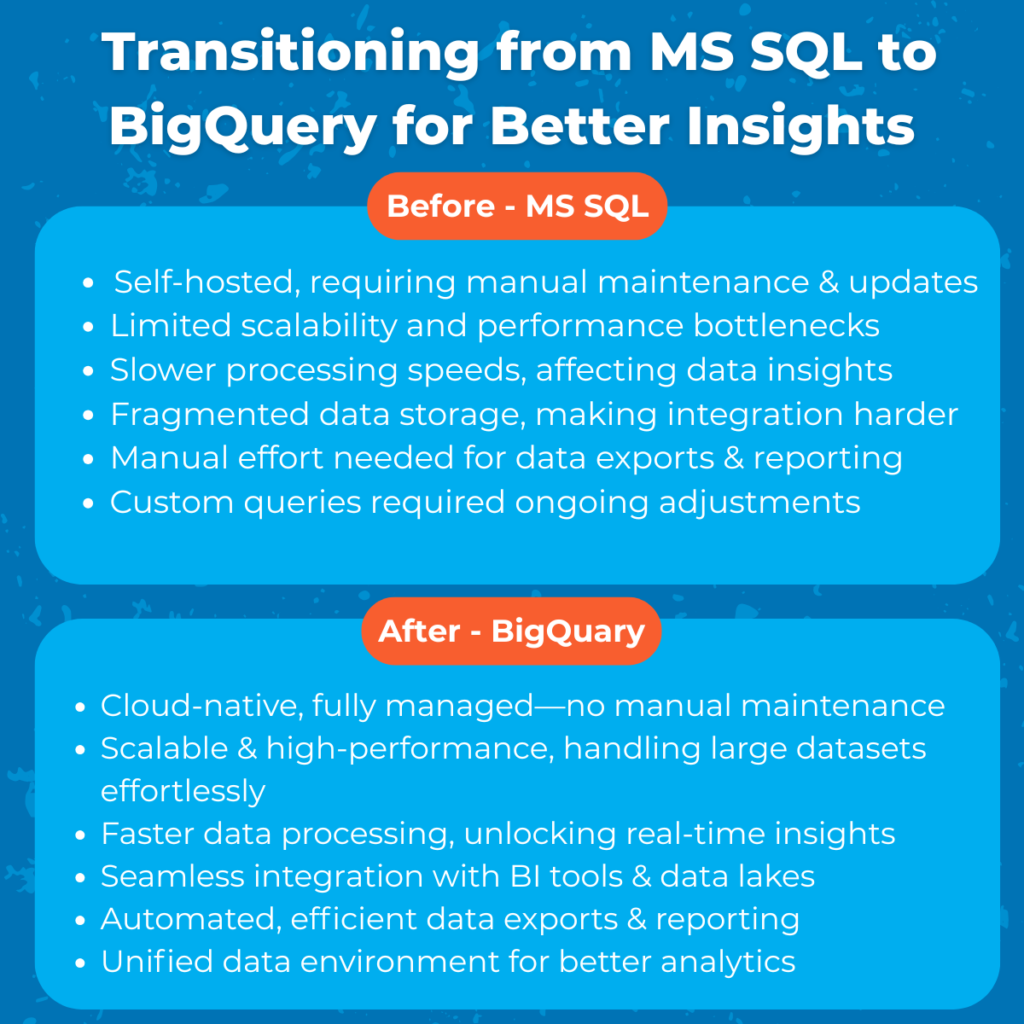
To achieve this, we are gradually phasing out and decommissioning any self-hosted MS SQL server previously offered to clients. MS SQL has proven to serve clients so far, yet given it doesn’t align with our vision yet given it is a self-hosted solution it has limitations with respect scalability and flexibility, while requiring heavy maintenance, slowing down innovation. It requires heavy maintenance, slowing down innovation. In contrast, BigQuery is cloud-native, built for speed, scalability, and seamless integration, enabling faster, more insightful data processing. This shift ensures we stay at the forefront of technology, providing our customers with the cutting-edge solutions they need.

Why Are We Making This Change?

By transitioning to BigQuery, we’re making a strategic move toward a more integrated and future-ready data environment. BigQuery is a best-in-class, scalable data warehouse solution that offers faster processing, better integration with BI tools, and enhanced analytics capabilities—ensuring that we can continue to provide the best insights and services. This shift enables us to:

Embrace next-generation technology – Strengthening our infrastructure with advanced, scalable, and high-performance data solutions.
Improve data speed, scalability, and flexibility – Managing and analyzing data becomes faster and more adaptable to your needs.
Enhance analytics and reporting capabilities – Access deeper insights with a more seamless and powerful data experience.
Ensure e-satisfaction remains the central hub for your VoC data – Bringing everything together for a more cohesive and integrated data ecosystem.

This way, we continue evolving to serve you better with cutting-edge solutions. 

What Does This Mean for You?

This change impacts you differently based on whether you use MS SQL or not . 

How Do I Know If I Am Using MS SQL?

If you’re unsure whether you’re using MS SQL, don’t worry—chances are, you’d already know. If you were using it, you’d likely be in close contact with your IT or Dev teams, as they manage and maintain the setup. But if you’re still unsure, reach out to them for confirmation!

If You Don’t Use MS SQL

Since you are not using MS SQL this change will not impact on your existing setup—everything remains the same.

However, if you’re looking to optimize how you extract and analyze data, now is a great time to explore our Data Out capabilities with BigQuery. BigQuery offers faster data processing, greater scalability to handle large datasets, and seamless integration with your Business Intelligence tools, making data analysis quicker, easier, and more insightful.

If You Use MS SQL

As we move toward a more integrated data environment, there are key changes to the way we manage data. Starting in January 2026, we will no longer support our self-hosted MS SQL database for data reception from e-satisfaction. While this shift brings exciting improvements, it’s important to understand how it affects your data access. Although your MS SQL database will no longer receive new data, rest assured that no data will be lost. Your historical data will still be accessible, but it will only be available through BigQuery moving forward.

MS SQL Servers will gradually fade away as 2025 progresses, which will give us plenty of time to help you with the integrations that you need. In more detail:

  • January 2025 – Full Automation: As part of establishing BigQuery at the center of VoC data and improving Data Out integrations, we have instituted full automation of data flows to MS SQL Servers, eliminating any  will be part of our full data flow automation and will require no manual work for updates to be updated. This is part of our bigger Data Out Integrations initiative which will be fully automated to help you migrate to any database / data lake you desire.
  • May 2025 – MS SQL support ends: May 31st, will be the last day we will support requests for updating MSSQL tables manually. After that date, we will no longer be able to perform any manually update to custom tables on MS SQL Servers. Given BigQuery, any data updates will run automatically, updating Automated data will still be updated on the servers on a daily basis.
  • December 2025 – MS SQL Server is officially decommissioned: By the end of December 2025, MS SQL Server will be fully decommissioned and put to sleep. There will be no going back from this moment onward. 
  • January 2026Data will only be accessible via BigQuery: Client VoC Data will be available only via BigQuery. 

Transitioning away from MS SQL to BigQuery.

As we move away from supporting MS SQL and fully transition to BigQuery, customers should consider the following factors to ensure continued access to their data and minimize disruptions to their workflows:

  • Data Storage & Access: Transitioning to BigQuery means adjusting how you pull and access your data. If you use BI tools or manage your data elsewhere, you’ll need to update your configurations to pull data from BigQuery instead of MS SQL. Planning this transition early will ensure you avoid any gaps in your data access.
  • Historical Data Availability: If you have historical data older than 2018, it’s important to extract it from MS SQL before the full decommissioning. Failure to do so may result in permanent data loss, especially since our retention policy limits availability to the past 5 years.
  • Data Exports & Integrations: After the May 2025 deadline, all data extraction will need to be done via BigQuery. This means reconfiguring your data pipelines to integrate with BigQuery instead of relying on MS SQL. Customers should review their plan and subscription license with respect to applicable export limitations or included integrations and make any necessary adjustments to ensure smooth data exports. Upon transitioning to BigQuery, clients will be able to export data collected during the subscription period and per their plan. If data older than 2 years must be exported, it may require making commercial arrangement with account managers.
  • BI & Reporting Tools: If you use Power BI, Tableau, or other BI tools, you’ll need to update the data sources to connect with BigQuery. Be mindful of schema changes that may impact how your data is presented in your reports, and plan your updates accordingly.
  • Custom Queries & Views: Any custom queries previously run on MS SQL will need to be adapted to BigQuery’s syntax. This may require some changes in your queries to ensure they work with the new schema, so plan ahead to avoid delays.
  • Automation & Workflows: If you have automated workflows that rely on MS SQL, you will need to reconfigure them to interact with BigQuery. Updating any scripts or scheduled jobs will be essential to maintaining the automation and smooth operation of your processes.

For a smooth transition and avoid disruptions, it’s important to begin planning now. Depending on your current usage and dependencies, some actions may require more time, so take the necessary steps well in advance of the January 2026 deadline.

What You Need to Do

We recommend planning your transition between May 2025 and December 2025 to ensure a smooth shift. Here’s what you need to do:

Consult Your IT Team:
If you’re unsure whether you’re using MS SQL, your IT or development team can help confirm this.

Extract Your Data:
If you need historical records older than 2018, back them up before the transition to ensure no data is lost. If you need data that is either a) older than 12-months but within 5 year retention, or b) part of previous subscription periods, you may need additional plan privileges to extract from BigQuery  

Adapt Your Integrations:
If you use visualization tools connected to MS SQL, update them to work with BigQuery’s schema to maintain seamless integration and functionality.

Set Up Your Own Database (if needed):
If you need to maintain a separate database, you will need to set up your own database in your environment after the transition.

Got Questions?

You can reach us via our Support Portal for assistance.

A Smarter Way to Get Support: Meet Our New Portal & Improved Process


We know that when you need support, you need it fast, clear, and hassle-free. Whether you’re troubleshooting a technical issue, reporting a bug, requesting a feature, or simply looking for guidance on product usage, getting help should be seamless. We’ve listened to your feedback and redesigned our support system to serve you better. 

Starting today March 5, 2025, we’re launching the e-satisfaction Support Portal—a faster, more structured, and more efficient way to help you succeed in adopting our platform and fulfilling your Voice of the Customer needs.

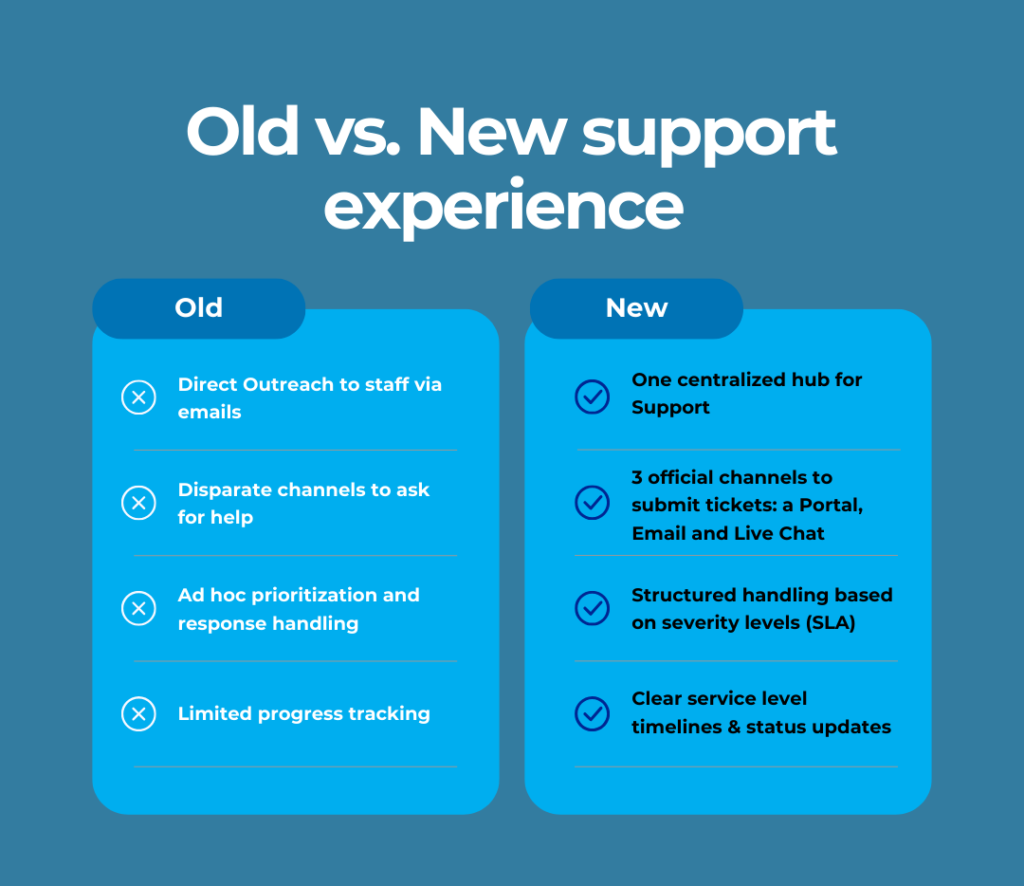
While emails and direct outreach worked in the past, they sometimes led to inconsistent responses, and difficulty tracking issues. That’s why we’re introducing a dedicated Support Portal, your go-to hub for everything from troubleshooting technical issues and reporting bugs to submitting feature requests and getting help with account configurations.

Alongside the portal, we’re introducing a Service Level Agreement (SLA) to guide its operation, defined response and resolution times so you always know what to expect. With these updates, support will be a quicker, more transparent and and a more reliable way to handle your requests.

A Better Support Experience for Everyone

The Support Portal will become the official way to get assistance from our teams, replacing direct emails and ensuring a faster, more structured support experience. Here’s what you can expect:

A single, centralized support hub – No more guessing who to contact; all requests will go through the Support Portal, email, or live chat, ensuring every issue is handled efficiently.

Faster responses with clear timelines – Every request will follow a structured process with defined SLAs, so you’ll always know when to expect a response and how long resolution may take.

Goodbye to direct emails for support – Reaching out to individual team members for assistance will be phased out, ensuring all requests are tracked, prioritized, and resolved through the correct channels.

With this new system, your support experience will now follow a structured process with clear categories, tracked status updates, and defined response times. You’ll get the help you need—when you need it.

A new way to get support – How does it work?

As part of new portal experience, whether it’s a product question, technical issue, bug report, or feature request, all support inquiries must be submitted through the official support channels:

  • Raise/ Submit a Ticket (Primary Method) at  Support Portal  The best way to get assistance. Submit a request through the portal for structured tracking, clear categorization, and faster resolution.
  • Send an email at [email protected] (Alternative Method) – Messages sent to our support team inbox will automatically convert into a support ticket.
  • Start Live Chat – Available during business hours for quick guidance and immediate assistance.

Reminder: emailing individual team members directly —such as Account Managers (AMs) or Customer Success Managers (CSMs), about a support-related issue, will no longer be the way to request support. Instead, in the spirit of our customer-centricity they will help log your request on your behalf—but they will do so through the Support Portal or official email channels to ensure faster and more efficient handling.

From there, a specific process, as per our SLA will be followed. Feel free to read and study it but here are some quick tips on how to open a support ticket and how our support team will handle it.

How to Make the Most of It:

Bookmark the Support Portal – This will be your go-to hub for all support needs. 

Understand SLA Response Times – Read the Service Level Agreement (SLA) to know when to expect responses based on issue severity.

Be clear & detailed in requests – The more context you provide, the faster we can resolve your issue.

Our team is here to help you

How to Open a Support Ticket 

Step 1: Submit Your Request

Option A – Suggested Option: You can submit your support tickets directly through our support portal

You have the option to either sign up or log in to track the status of your tickets, or you can submit a ticket without creating an account if you prefer.

  • Choose the request type that best describes your issue:
    • General Tickets:
      • Ask a Question – General inquiries about features, usage, or best practices.
      • Report an Incident – Technical issues, system errors, or service disruptions.
      • Submit a Feature Request – Suggestions for platform improvements.
      • Report a Bug – System malfunctions or unexpected behavior
    • Professional Services Requests:
      • Data Services requests – Need help with dashboards, reports or data extraction.
      • Managed Services requests – Account-related support or follow up on discussion with our Customer Success Team or Account Managers.

Option B: Send an email to [email protected].

You can create support tickets by emailing our support team at [email protected].
However, we recommend using Option A, as tickets submitted through the platform are automatically prioritized in our support queue.

Step 2: Provide Request Details

Whether submitting via the Support Portal or Email, include the following information to ensure faster resolution:

  • A concise summary of your issue or question.
  • Detailed description including any relevant error messages, affected features, or steps to reproduce the issue.
  • Attachments or screenshots (if applicable) to help diagnose the issue faster.
  • You can also add colleagues as request participants (via Shared with option) if you’d like them to receive notifications and stay updated on the ticket progress.

📧 Email Requests Only: If details are missing, our team may reach out for clarification before processing the request.

Step 3: Acknowledgment, First Response & Service Level Tracking

Here is what to expect after you raise a request/ ticket. 

  • Our support team will acknowledge receipt of your request, confirming that a ticket has been logged / opened into our system.
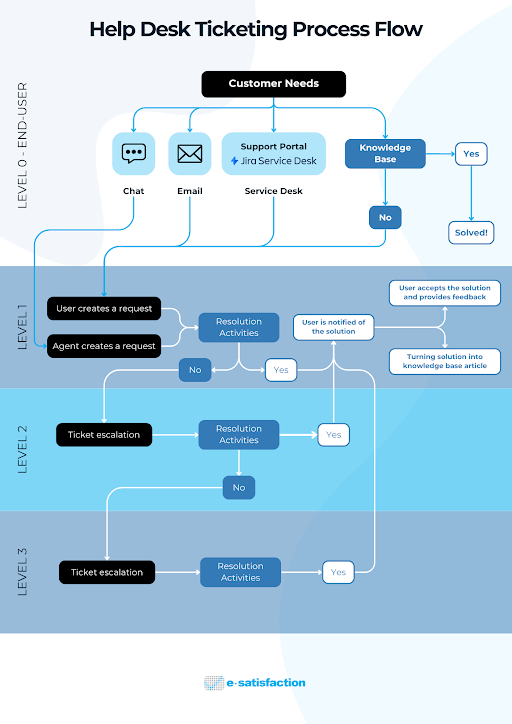
  • Then, once a member of our team has taken ownership of the ticket, we will communicate with a first response and based on the type of issue, the support team will assign an appropriate support level (L1, L2, or L3).
  • From there, the support team will work towards a resolution to your request within the timeframe outlined in the SLA, providing updates as progress is made.
  • If additional information is needed, or we estimate the ticket takes longer to resolve, the team will reach out through the portal or via email about the need for escalating your ticket.
  • You can always monitor progress via the support portal, checking the status or keeping track of conversations directly. 

Here is an infographic to help you understand the support process:

Service Level Agreement (SLA): The backbone of the enhanced Support Experience

Our new SLA is a major step toward delivering exceptional service and ensuring you get the support you need with clear expectations. The new Service Level Agreement (SLA) ensures predictability, and fairness in handling support requests. The SLA sets guides support process through:

First Response Time: The time it takes for our team to formally respond to your request.

Resolution Time: The expected timeframe for resolving different types of support issues.

Issue Prioritization: Requests are categorized based on urgency and impact, ensuring critical issues are addressed swiftly.


What Does This Mean for You?

With a more structured approach, our team ensures you always know when to expect a response and how long a resolution may take. Critical issues receive immediate attention, while lower-priority requests are managed within expected timeframes.

Our team will ensure every request follows a structured process, eliminating uncertainty and inefficiencies.

How Can You Make the Most of It?

  • Be aware of response and resolution times outlined in the SLA.
  • Trust the process—we’re actively working on your request, even if some issues take longer to resolve based on severity.
  • Understand that not all requests can be resolved immediately but their resolving time is based on their severity (Check service  levels) .

Here are some key points of our SLA 

Support Availability

  • Business hours: 10:00 A.M. – 6:00 P.M. EET/EEST (Monday to Friday)
  • Initial response time: 1 business day
  • After-hours requests: Collected but processed the next business day

Support levels

  • Default response & resolution times apply unless a custom subscription or paid support plan is in place.

Criticality

First Response Time (FRT)

Resolution Time

Critical (P1)

30 minutes

2-4 hours

High (P2)

4 hours

1-2 business days

Medium (P3)

1 business day

3-5 business days

Low (P4)

2 business days

1 – 4 weeks, depending on priority

  • Exclusions: Bug resolution and feature request timelines are not included (see Incident Management for details).
  • After-hours requests: Handled and counted from the next business day.

To ensure a smooth experience, we encourage all users to review the full SLA document and familiarize themselves with response times for different request types.